Dance and Movement Photography Camera Settings
For dance photography camera settings, start near 1/500 sec, your lens’s widest useful aperture, and Auto ISO. Use continuous autofocus and short bursts, then adjust shutter speed to suit the movement and light.
On this page (10 sections)
- What dance photography camera settings make a good starting point?
- Which shutter speed suits each dance moment?
- What aperture works for dance photography in a dim theater?
- How high should ISO go under stage lights?
- Should you use autofocus tracking and burst mode?
- How can you avoid blur without losing too much light?
- Where should you focus and how should you frame?
- How should you manage memory during a performance?
- What should you check before the performance?
- Which dance photography camera settings should you choose?
For dance photography camera settings, start near 1/500 sec, your lens’s widest useful aperture, and Auto ISO. Use continuous autofocus and short bursts to catch a clear pose, then adjust for the stage light and pace of the dance.
Fast jumps need a faster shutter than held poses. A wider aperture helps in dim venues, while a slower shutter can show motion when you want a more expressive result.
What dance photography camera settings make a good starting point?
Start with shutter priority at about 1/500 sec, or use manual exposure with Auto ISO if you want to set both shutter speed and aperture. Keep continuous autofocus on for moving dancers.
Take a frame and check its brightness and focus. Change one setting at a time so you can tell whether the shutter, aperture, or ISO needs adjustment.
Use shutter speed to control how motion appears, aperture to let in light and soften the background, and ISO to brighten the image when light is limited.
Which shutter speed suits each dance moment?
Use about 1/500 sec for general movement, and try 1/800 sec or faster for quick turns, jumps, and crisp limb detail. Slower speeds can work for held poses or intentional blur.
These are starting points, not fixed rules:
- Held poses and slower gestures: try 1/250 sec.
- General movement: start near 1/500 sec.
- Fast jumps and turns: try 1/800 sec or faster.
- Intentional motion blur: begin near 1/60 sec and pan smoothly with the dancer.
Review a few frames at high magnification, especially around the face, hands, and feet. If the face is sharp but the hands blur, raise the shutter speed or time the exposure for a brief pause in movement.
What aperture works for dance photography in a dim theater?
Choose the widest aperture your lens offers when the stage is dark. A lower f-number lets in more light, which can help you keep a faster shutter speed.
A wide aperture also makes the area in focus shallower. If you want several dancers sharp together, stop down a little and compensate with a higher ISO or, if the movement allows it, a slower shutter.
For a Sony E-mount camera, the Sigma 30mm f/1.4 DC DN is a bright prime lens suited to low-light dance work. Its fixed focal length means you’ll need to move or reframe rather than zoom.
Choose this lens if you use a compatible Sony E-mount camera and can work at a fixed focal length. Skip it if you need to zoom from a fixed seat or have a Canon RF or Nikon Z camera.
How high should ISO go under stage lights?
Raise ISO until the dancer is bright enough at the shutter speed and aperture you need. A little image noise is often preferable to an underexposed frame with motion blur.
Auto ISO lets the camera adjust brightness while you hold the shutter speed steady. If you set an ISO limit and reach it, decide whether to raise that limit, open the aperture, or slow the shutter.
A test frame in similar light can help you choose a practical ISO range before the performance. Learn more about what ISO does on a camera.
Should you use autofocus tracking and burst mode?
Use continuous autofocus to follow dancers moving across or toward your position. Put the active focus area near the face or upper body, and use short bursts around the moment you want to capture.
The Canon EOS R10 can shoot up to 15 frames per second with its mechanical shutter, and its autofocus includes subject detection and tracking. It suits photographers who want to capture several frames during quick action and choose a sharp pose afterward.
The R10 is a body only, so budget for a compatible RF or RF-S lens, or an EF or EF-S lens with the required mount adapter. Skip it if you want a complete camera and lens kit in one box.
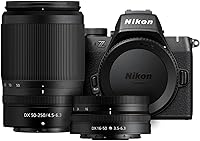
The Nikon Z50 II can detect and track people, which makes it a useful fit when dancers move around the frame. It also records 4K UHD/60p video, so it may suit someone who wants to capture both stills and video.
Choose the Z50 II if subject recognition is central to your focus workflow. Like the Canon, it is a body only, so plan for a compatible Nikon Z lens.
Both cameras can help with moving subjects, but the lens and your shooting position affect how much of the stage you can frame. Compare other camera options in our guide to cameras for sports photography.
How can you avoid blur without losing too much light?
Decide first whether you want the dancer frozen or motion visible. Increase shutter speed for crisp hands, feet, and costume details; lower it when a trace of blur helps show movement.
If the frame is too dark, open the aperture before slowing the shutter, as long as your lens allows it. Raise ISO when you need to keep both a fast shutter and a wide aperture.
Hold the camera steadily and follow the dancer smoothly. Image stabilization can reduce blur from your own movement, but it cannot freeze a dancer moving during the exposure.
Where should you focus and how should you frame?
Put the focus area over the face or upper body, where sharp detail matters most. If dancers cross in front of one another, use a smaller focus area or move it deliberately so focus stays on the intended performer.
Leave space in the direction the dancer is moving. Frame a little wider than the final composition needs, especially for jumps and extended poses, so hands and feet don’t get cut off.
How should you manage memory during a performance?
Check card capacity before the event and use short bursts to limit extra frames. If you plan to record video as well, allow room for those files.
The SanDisk Extreme PRO 64GB card is an SDXC card with a V30 video speed class. Confirm that your camera accepts SDXC cards and that 64GB is enough for the session.
Back up any files you want to keep before formatting a card in the camera. Bring a spare if you expect to shoot many bursts or record video throughout the show.
What should you check before the performance?
Check venue rules, battery charge, card space, and lens choice before taking your seat. Ask about flash restrictions because many performances prohibit flash.
Arrive early enough to take a frame in the available light if the venue permits it. Confirm that autofocus tracking works, the exposure looks right, and your chosen shutter speed freezes the movement you care about.
A compatible lens matters as much as the camera body. If you’re still choosing a first interchangeable-lens camera, our beginner camera guide explains the trade-offs between DSLR, mirrorless, and zoom cameras.
Which dance photography camera settings should you choose?
For a sharp general-purpose setup, begin near 1/500 sec, the widest useful aperture, continuous autofocus, and Auto ISO. Move toward 1/800 sec or faster for jumps, or toward 1/250 sec when the light is scarce and some blur is acceptable.
Pick the Canon EOS R10 if its burst rate and subject tracking fit your action needs. Choose the Nikon Z50 II if people detection suits your focusing style, or the Sigma 30mm f/1.4 if you use a compatible Sony E-mount camera and need a bright fixed lens.
Use a compatible SDXC card with enough space for your session. For more help with motion control, see our guide to shutter speed.
Frequently asked questions
What shutter speed should I use for dance photography?
Start near 1/500 sec for general movement, then try 1/800 sec or faster for jumps and crisp hand or foot detail. A held pose may look sharp around 1/250 sec, while slower speeds can show intentional motion blur.
Review a few frames at magnification and adjust for the dancer, lens, and available light.
What camera mode is best for dance photography?
Shutter priority is a useful starting point because you choose the motion-freezing speed and the camera selects an aperture. Manual exposure with Auto ISO gives you more control over shutter speed and aperture, especially when stage lighting stays fairly steady.
Should I use flash for dance photography?
Ask the venue or event organizer before using flash. Many performances prohibit it because it can distract dancers and the audience.
When flash isn't allowed, open the aperture, raise ISO as needed, and choose a shutter speed that suits the movement.
How do I focus on dancers in low light?
Use continuous autofocus and keep the focus area over the dancer’s face or upper body as they move. Open the lens aperture if focus remains reliable; if the image is still too dark, raise ISO or accept some motion blur with a slower shutter speed.