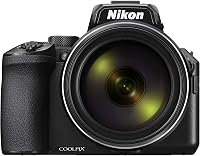
Kodak PIXPRO AZ528 Review: Worth It? (November 2026)
This Kodak PIXPRO AZ528 review finds it best for distant subjects, burst shooting and sharing photos over Wi-Fi. Choose the AZ425 for its 20MP BSI CMOS sensor, the AZ405 for AA battery power, or the Panasonic FZ80D for 4K Photo features.
On this page (9 sections)
- Kodak PIXPRO AZ528 review: who should buy it?
- How does the AZ528 compare with the AZ425 and AZ405?
- Should you choose the AZ528 or Panasonic Lumix FZ80D?
- How should you use a 52x zoom without losing your subject?
- Is the AZ528 manageable for a beginner?
- What should you prepare before your first outing?
- How can you care for the camera and avoid common mistakes?
- Kodak PIXPRO AZ528 review: which camera should you choose?
- Frequently asked questions
This Kodak PIXPRO AZ528 review is for buyers who want a long zoom, stabilization, burst shooting and phone sharing in one bridge camera. The AZ528 combines a 24mm wide-angle lens, 52x optical zoom and 6fps burst mode for travel, wildlife and sports from a distance.
It also has clear limits: its sensor is 16MP, it records 1080p Full HD video, and its LCD is fixed. If a 20MP sensor, AA batteries or 4K Photo features matter more, the alternatives below may fit better.
Kodak PIXPRO AZ528 review: who should buy it?
The AZ528 suits you if you want one built-in lens for wide scenes and faraway subjects. It can frame landscapes at its wide end, then zoom in on birds, performers or athletes without changing lenses.
Its optical image stabilization helps counter hand movement, a useful aid when framing at long zoom. It cannot freeze a moving subject, so action shots still depend on light, shutter speed and timing.
The 6fps burst mode gives you a sequence to review when a subject moves unpredictably. Use it for a bird taking off or a player crossing the frame, then keep the sharpest composition rather than expecting every frame to be clear.
Skip the AZ528 if you need 4K video, a movable screen, or a camera built around a higher-resolution sensor. Consider the Panasonic for 4K Photo features, or compare the AZ425 if its 20MP BSI CMOS sensor matters more than extra reach.
Kodak PIXPRO AZ528: Best for wildlife and sports

- 52x optical zoom
- 16MP BSI CMOS sensor
- 6fps burst mode
- Wi-Fi and 1080p video
A long-zoom bridge camera with optical image stabilization, 6fps burst shooting and built-in Wi-Fi. It suits distant subjects and quick sharing, though it records Full HD video rather than 4K.
Pros
- 52x optical zoom
- Optical image stabilization
- 6fps burst mode
- Built-in Wi-Fi and 1080p Full HD video
Cons
- 16MP resolution
- Fixed LCD display
- No 4K video
What makes the AZ528 a useful long-zoom camera?
Its combination of 52x optical zoom and 6fps burst shooting is the main reason to choose it. Optical zoom uses the lens to frame a distant subject, while digital zoom crops the image, so use the optical range when image detail matters.
Wi-Fi adds a practical sharing option. You can transfer photos to a compatible phone or tablet, or use the phone as a live remote viewfinder when the camera is positioned out of reach.
The camera records 1080p Full HD video. Choose it for still photos and Full HD clips, not for 4K video capture.
How does the AZ528 compare with the AZ425 and AZ405?
The AZ528 offers the longest optical zoom of these 3 Kodak models, while the AZ425 and AZ405 both have 20MP sensors. Pick among them based on how much reach you need and how you want to power the camera.
| Camera | Optical zoom | Sensor | Distinguishing feature |
|---|---|---|---|
| Kodak PIXPRO AZ528 | 52x | 16MP BSI CMOS | Wi-Fi and 6fps burst mode |
| Kodak PIXPRO AZ425 | 42x | 20MP BSI CMOS | Rechargeable battery |
| Kodak PIXPRO AZ405 | 40x | 20MP CMOS | Runs on AA batteries |
The AZ425 is for buyers who want a 20MP BSI CMOS sensor and can trade some reach for it. Its rechargeable battery is rated for about 240 shots per charge, and the camera records 1080p video.
The AZ405 is a better match when standard AA batteries suit your travel plans. It has a 20MP CMOS sensor and stabilization, with less optical zoom than the AZ528.
For more long-lens options, see our guide to bridge cameras with a big zoom. If birds are your main subject, our guide to cameras for birding and backyard birds covers camera features to consider for distant wildlife.
Should you choose the AZ528 or Panasonic Lumix FZ80D?
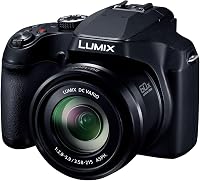
Choose the AZ528 for built-in Wi-Fi and a straightforward 6fps burst option. Choose the Panasonic Lumix FZ80D if you want 60x optical zoom, an OLED viewfinder and 4K Photo features.
The FZ80D has a 20–1200mm lens range, a 3 in touch LCD and an OLED viewfinder. Its 4K Photo feature captures at 30fps, and it includes focus and brightness composite functions.
The AZ528 gives you phone transfer and remote live view through Wi-Fi. Its Full HD video and 6fps burst mode suit buyers who do not need the Panasonic's 4K Photo tools.
One practical difference is flash: the FZ80D has no flash. If you often take indoor snapshots and rely on built-in flash, factor that into your choice.
Our guide to travel zoom cameras can help if you want a flexible lens for trips. For the broader trade-off between a fixed-lens zoom and interchangeable lenses, read bridge camera vs DSLR.
How should you use a 52x zoom without losing your subject?
A 52x zoom helps frame a distant subject, but it narrows the view and makes it harder to find that subject in the LCD. Start wide, locate the bird or performer, then zoom in gradually while keeping the camera steady.
At long zoom, even small hand movements shift the framing. Hold the camera with both hands, tuck your elbows close, and use a railing or other steady support when one is available.
Stabilization helps with camera movement, while shutter speed matters for subject movement. If a bird or athlete is moving, choose a faster shutter speed when the light allows and take a burst to improve your chances of getting the moment you want.
Bright light and clear air also help distant subjects look defined. Haze, dim conditions and movement can limit detail, so don't assume that maximum zoom alone will produce a sharp frame.
Is the AZ528 manageable for a beginner?
The AZ528 can work for a beginner who wants a single built-in lens and is willing to practice at long zoom. You avoid changing lenses, and the LCD lets you frame and review pictures on the camera.
A common early mistake is zooming all the way in before finding the subject. Begin at the wide end, center the subject, and extend the zoom only as far as needed.
Another mistake is expecting stabilization to stop motion blur. Learn how shutter speed affects moving subjects with our guide to what shutter speed means, then try a short burst for action.
If simplicity matters more than extreme zoom, read our guide to the best cameras for beginners. It compares camera types for people choosing their first camera.
What should you prepare before your first outing?
Set up the AZ528 at home so the basic controls and phone connection are familiar before you leave. Charge the rechargeable Li-ion battery, insert a compatible Class 10 SD, SDHC or SDXC card, and take a few practice photos to confirm that the camera saves them.
The AZ528 accepts memory cards up to 1.5TB. Choose a card that fits your storage needs, and leave room to review and keep burst sequences rather than assuming every frame will be useful.
Pair the camera with your phone before a trip if you plan to transfer photos or use remote live view. Check Kodak's current app instructions and device compatibility, since app steps can change.
For a long outing, start with a charged battery and bring charging access into your plan. Use burst mode selectively, since several frames of each moment take more card space and time to sort later.
How can you care for the camera and avoid common mistakes?
Keep the lens cap on when the camera is stored or carried, and use a clean, dry place for the camera and accessories. Avoid touching the front lens surface, since fingerprints and dust can affect your pictures.
At long zoom, take a moment to steady the camera before pressing the shutter. Press gently, check the frame on the LCD, and take another shot if the subject moved or the image looks soft.
Don't confuse digital zoom with extra optical reach. Use the optical zoom for the clearest framing, and avoid digital cropping when you need the most detail.
Finally, check battery and card space before leaving. Burst photos and Full HD video use storage, and a low battery can cut a session short.
Kodak PIXPRO AZ528 review: which camera should you choose?
Choose the AZ528 if you want 52x optical zoom, stabilization, 6fps burst shooting and Wi-Fi in one camera. It is the clearest fit for distant subjects and buyers who want to transfer photos from the field.
Choose the AZ425 if a 20MP BSI CMOS sensor and rechargeable power matter more than maximum zoom. Choose the AZ405 if AA batteries suit your travel plans, or the FZ80D if its 60x zoom and 4K Photo features match your priorities.
For a wider explanation of this camera type, start with our bridge camera guide. Use it to decide whether a fixed-lens zoom camera fits how you want to photograph.
Frequently asked questions
Is the Kodak PIXPRO AZ528 good for bird photography?
The AZ528 suits bird photography when you want long reach in a fixed-lens camera. Its optical zoom helps frame distant birds, stabilization helps counter hand movement, and burst mode gives you several frames to review when a bird moves.
Start at a shorter zoom to find the bird, then zoom in and brace the camera when possible.
Does the Kodak PIXPRO AZ528 have image stabilization?
Yes. The AZ528 has optical image stabilization to help counter movement from your hands, which can make framing at long zoom settings easier.
Stabilization does not stop a moving bird or athlete from blurring. For action, use a fast shutter speed when the light allows and take a short burst.
Can the Kodak PIXPRO AZ528 transfer photos to a phone?
Yes. The AZ528's built-in Wi-Fi supports transfers to a compatible iOS or Android phone or tablet, and you can use a phone as a live remote viewfinder.
Set up the connection at home and check Kodak's current app instructions before relying on it during a trip.
Does the Kodak PIXPRO AZ528 record 4K video?
No. The AZ528 records 1080p Full HD video.
The Panasonic Lumix FZ80D offers 4K Photo at 30fps, a still-photo feature that differs from 4K video.
If video resolution is a deciding factor, confirm that the camera records the format you need before buying.
Frequently asked questions
Is the Kodak PIXPRO AZ528 good for bird photography?
The AZ528 suits bird photography when you want long reach in a fixed-lens camera. Its optical zoom helps frame distant birds, stabilization helps counter hand movement, and burst mode gives you several frames to review when a bird moves.
Start at a shorter zoom to find the bird, then zoom in and brace the camera when possible.
Does the Kodak PIXPRO AZ528 have image stabilization?
Yes. The AZ528 has optical image stabilization to help counter movement from your hands, which can make framing at long zoom settings easier.
Stabilization does not stop a moving bird or athlete from blurring.
For action, use a fast shutter speed when the light allows and take a short burst.
Can the Kodak PIXPRO AZ528 transfer photos to a phone?
Yes. The AZ528's built-in Wi-Fi supports transfers to a compatible iOS or Android phone or tablet, and you can use a phone as a live remote viewfinder.
Set up the connection at home and check Kodak's current app instructions before relying on it during a trip.
Does the Kodak PIXPRO AZ528 record 4K video?
No. The AZ528 records 1080p Full HD video.
The Panasonic Lumix FZ80D offers 4K Photo at 30fps, a still-photo feature that differs from 4K video.
If video resolution is a deciding factor, confirm that the camera records the format you need before buying.