Best DSLR for Beginners: How to Choose One
The best DSLR for beginners is a kit that fits what you want to photograph and gives you room to learn. Choose a Canon EOS Rebel T7 kit for a simple start, or the Nikon D7500 kit for more autofocus points, faster continuous shooting and 4K video.
On this page (10 sections)
- What should the best DSLR for beginners offer?
- Should you choose a DSLR or another beginner camera?
- Which DSLR kit fits your first subjects?
- How should you choose a first DSLR lens?
- Which DSLR features matter most to a beginner?
- How can you set up a DSLR for your first photos?
- What common beginner DSLR mistakes should you avoid?
- How should you care for a beginner DSLR?
- How should you choose between these beginner DSLR kits?
- Which DSLR should a beginner choose?
The best DSLR for beginners is a kit that fits your first subjects and gives you room to learn. The Canon EOS Rebel T7 kits offer a straightforward start, while the Nikon D7500 kit adds more autofocus points, faster continuous shooting and 4K video.
Begin with the subjects you expect to photograph most: family gatherings, travel, portraits, sports or everyday scenes. Then match the kit lens and camera features to those plans instead of paying for capabilities you may rarely use.
A DSLR uses a mirror to send the view through the lens to an optical viewfinder. That direct view appeals to many beginners, and interchangeable lenses let you change how you frame a scene as your skills develop.
If you're still comparing camera types, start with our guide to the best cameras for beginners. It compares DSLR, mirrorless and zoom cameras by the kind of experience each offers.
What should the best DSLR for beginners offer?
The best DSLR for beginners offers a viewfinder you like using, a suitable first lens and controls you can learn. A long feature list matters less than a camera that fits the subjects you want to photograph and the way you plan to practice.
Think first about the lens. A zoom lens lets you adjust framing without changing your position, while a prime lens has one fixed focal length and asks you to move closer or farther away.
A kit that includes a useful zoom lets you start shooting before you decide whether you need a specialized lens.
Autofocus and continuous shooting matter more when your subjects move. For still life, landscapes and many portraits, you can take your time with focus and framing; children, sports and wildlife are harder to capture if the camera can't keep up with the action.
Consider video separately from still photography. Full HD is enough for many personal clips, but choose a camera with 4K if that resolution is a specific need.
A camera body is part of a system. The mount affects which lenses fit, so consider the lens family if you expect to add lenses later.
Should you choose a DSLR or another beginner camera?
Choose a DSLR if an optical viewfinder and interchangeable lenses appeal to you. Compare mirrorless cameras as well if you want a different camera design or are still weighing size, controls and future lens choices.
Camera type alone doesn't tell you how easy a model will be to learn. The controls, menu layout, lens bundle and the subjects you photograph all shape the experience.
Our best cameras for beginners guide compares the main camera types. If you already know your preferred brand, see our guides to Canon cameras for beginners and Nikon cameras for beginners.
Which DSLR kit fits your first subjects?
Match the kit to the lens range, autofocus and video features you plan to use. The Canon kits share a body and core features but include different lens bundles; the Nikon kit brings a different set of capabilities.
Which Canon T7 kit suits a beginner DSLR photographer?
The Canon EOS Rebel T7 Double Zoom Kit suits a beginner who wants more than one zoom lens included from the start. Its 24.1-megapixel APS-C sensor, 9-point autofocus and optical viewfinder with about 95% viewing coverage give you a straightforward base for learning.
Built-in Wi-Fi and NFC can help you share images, and the camera captures Full HD 1080p video. Canon's EOS Utility Webcam Beta Software can also turn a compatible camera into a webcam.
Pick this kit if you expect to photograph subjects at different distances and want lens choices ready to use. Skip it if you know one standard zoom will cover your needs or you don't want to sort through a larger bundle; check which lenses the current kit includes before choosing.
Is the Nikon D7500 a good DSLR for beginners?
The Nikon D7500 kit suits a beginner who wants more autofocus positions, quicker continuous shooting and 4K video. It includes an 18-140mm lens, a tilting 3.2-inch touch LCD and built-in Wi-Fi and Bluetooth.
Its 51-point autofocus system and burst rate of up to 8 frames per second are useful when you want to follow action or capture a quick sequence. The video options include 4K Ultra HD and Full HD.
Choose the D7500 if those features match your plans and you want a broad zoom range in the kit. Skip it if you want the simplest possible controls or won't use its faster shooting and 4K features, since those capabilities can add settings to learn.
Its lens uses the Nikon F mount, so consider your future lens choices as well.
For more models from the same brand, see our Nikon cameras for beginners guide.
Is the Canon EOS Rebel T7 kit a good first DSLR?
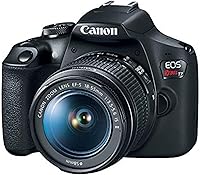
The Canon EOS Rebel T7 Kit suits a beginner who wants one standard zoom lens and a simple starting setup. Its included EF-S 18-55mm f/3.5-5.6 IS II lens lets you explore different framings without beginning with multiple lenses.
Like the other T7 kit, it has a 24.1-megapixel APS-C sensor, 9-point autofocus, AI Servo AF and Full HD 1080p video. The optical viewfinder covers about 95% of the view.
Choose this kit if everyday scenes and a single familiar zoom sound right. Skip it if you already know you'll need several lens ranges or if you want 4K video; the Nikon D7500 is the option here that includes it.
When should a beginner add the Canon EF 50mm f/1.8 STM?
Add the Canon EF 50mm f/1.8 STM when you want to explore portraits or nighttime photography with a wider maximum aperture. Its fixed 50mm focal length has an f/1.8 maximum aperture, and on an APS-C camera the effective focal length is 80mm.
The lens doesn't zoom, so you change framing by moving or repositioning yourself. Its stepping motor provides near-silent continuous focus for movies and smooth autofocus for still photos.
Choose it as a later lens if you often photograph portraits or want to work in dimmer settings. Skip it as your only lens if you need to move quickly between wide and distant views, or if you haven't yet learned what focal length you prefer.
How should you choose a first DSLR lens?
Choose a first lens based on the distance and framing you need most often. A zoom makes it easy to adjust the view from where you stand, while a fixed focal length encourages you to compose by moving around.
Use a kit lens for a few weeks of practice before buying another lens. Notice whether you often wish you could frame wider, reach farther, or take photos in lower light; each pattern points to a different kind of lens.
A fixed 50mm lens can be a useful next step for Canon DSLR owners interested in portraits. On an APS-C body, its 80mm effective focal length gives a narrower view than the lens's 50mm focal length on a full-frame camera.
Learn to use the camera's zoom and focus before shopping for upgrades. Our guide to what the numbers on a camera lens mean explains the markings that help you compare lenses.
Which DSLR features matter most to a beginner?
Prioritize the features tied to your actual subjects and shooting plans. Autofocus, continuous shooting, video resolution and the kit lens are easier to compare when you think about what you want the camera to do.
| Feature | Why it matters | Options in this guide |
|---|---|---|
| Optical viewfinder | Lets you frame through the camera's viewfinder | Both Canon T7 kits list about 95% viewing coverage |
| Autofocus points | Gives you positions to focus on across the frame | Canon T7 kits: 9; Nikon D7500: 51 |
| Continuous shooting | Captures a sequence of moving moments | Canon T7 kits: 3 frames per second; Nikon D7500: up to 8 |
| Video resolution | Sets the stated video capture resolution | Canon T7 kits: Full HD 1080p; Nikon D7500: 4K Ultra HD and Full HD |
| Kit lens | Shapes the framing choices available before you add lenses | Canon kits include zoom lenses; Nikon kit includes an 18-140mm |
Use the table to rule out features you don't need. If 4K video is a priority, the Nikon D7500 is the choice here that lists it; if Full HD meets your needs, both Canon T7 kits capture it.
More autofocus points can give you more options for where to focus, but you still need to practice selecting focus areas and following moving subjects. A higher point count alone doesn't make every shot easy.
How can you set up a DSLR for your first photos?
Start by charging the battery, inserting a compatible SD card and attaching the kit lens. Set the camera to automatic mode for your first few sessions, then learn one control at a time.
Before going out, check that the lens is locked in place and that the lens cap is off. Use the viewfinder to frame a still subject, half-press the shutter button to focus, then press fully to take the photo.
Practice with a subject that doesn't move much, such as a plant or a building. Once you can frame and focus consistently, take the same photo using a different exposure setting and compare the results.
A useful learning order is:
- Hold the camera steadily and frame through the viewfinder.
- Practice selecting a focus point and focusing on your subject.
- Try aperture priority to see how aperture changes depth of field.
- Use shutter priority to explore how shutter speed affects motion.
- Adjust ISO when you need to balance available light and image noise.
Don't change every setting at once. Learning one control at a time makes it easier to see what each choice changes.
Our first-time DSLR guide covers the first controls. For exposure basics, read our guides to aperture, shutter speed and ISO.
What common beginner DSLR mistakes should you avoid?
Avoid changing too many settings at once, buying lenses before you know your needs and overlooking focus. Each mistake makes it harder to learn what caused a photo to turn out as it did.
A common early mistake is assuming a more expensive or more feature-rich body will make every picture better. The Nikon D7500 offers more autofocus points, faster continuous shooting and 4K, but those features help only if you need them.
Don't use a long zoom range as a substitute for learning composition. Try moving your position, checking the background and keeping the subject in focus before deciding a different lens is the answer.
Beginners can also forget to check focus after changing settings. Review a few photos on the camera screen, especially when the subject is moving or you used a slower shutter speed.
Finally, avoid buying several lenses before you know what you want to photograph. Use the kit lens first, then choose an upgrade that solves a specific problem.
How should you care for a beginner DSLR?
Protect the camera and lens from dust, moisture and bumps, and keep the lens capped when you're not shooting. Handle the camera by its grip when changing lenses, and avoid touching the glass.
Use a clean, dry place to store the camera and keep it away from loose dust or grit. Before attaching a different lens, point the camera opening down and make the change promptly so less dust can enter.
If you see dust on the lens, use a blower or a clean lens cloth rather than rubbing it with clothing. Our guide to cleaning a camera lens explains a careful cleaning routine.
How should you choose between these beginner DSLR kits?
Choose the Canon EOS Rebel T7 Kit for one standard zoom, the Double Zoom Kit for more than one lens from the start, or the Nikon D7500 Kit for its autofocus, faster continuous shooting and 4K video.
Before buying, check that the exact kit is new and covered by a US warranty. DSLR stock can be uneven, so make sure the lens bundle and camera condition match what you intend to buy.
If you're choosing between Canon DSLR and mirrorless options, compare the Canon Rebel T7 and R100. To choose a brand first, read Nikon vs Canon cameras for beginners.
Which DSLR should a beginner choose?
Choose the Canon EOS Rebel T7 Kit if one everyday zoom is enough, the Double Zoom Kit if you want more than one lens included, or the Nikon D7500 Kit if its autofocus, faster continuous shooting and 4K video fit your plans. Those are the clearest choices for matching a beginner kit to your first subjects.
The best DSLR for beginners is the one you'll use to practice with a lens that suits your photography. If you're still deciding on camera type, compare the options in our beginner camera guide.
Frequently asked questions
Is a DSLR a good camera for a beginner?
A DSLR can be a good first camera if you want an optical viewfinder, physical controls and interchangeable lenses. It gives you room to learn focus and exposure while using a lens that suits your subjects.
Compare its size and lens options with mirrorless and bridge cameras before you decide, since a DSLR is not automatically the right fit for every beginner.
Should a beginner buy a DSLR with one lens or two?
A one-lens kit is simpler and can cover everyday subjects while you learn. A two-lens kit gives you more framing choices, but only helps if its ranges suit the scenes and distances you photograph.
Start with one lens if you're unsure.
Add another after you notice a clear gap in what your current lens can do.
How many autofocus points does a beginner need?
There isn't one autofocus-point count that suits every beginner. More points offer more positions to focus on, but choosing a focus area and following a moving subject also take practice.
The Canon T7 kits have 9-point autofocus, while the Nikon D7500 has a 51-point system.
Can I use a DSLR to record video?
Yes. The Canon T7 kits capture Full HD 1080p video, while the Nikon D7500 supports 4K Ultra HD and Full HD video.
Choose based on the resolution and recording features you expect to use.
If video is a main reason for buying, compare those capabilities before choosing a kit.