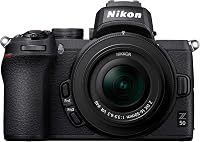
Nikon Z30 vs Z50: Which Is Better? (November 2026)
Choose the Nikon Z30 for vlogging, streaming and filming yourself; choose the Z50 for a stills and video mix with a stated 20.9 MP sensor. Both kits include a 16-50mm zoom lens.
On this page (7 sections)
The Nikon Z30 vs Z50 choice comes down to your camera habits: get the Z30 for filming yourself and streaming, or the Z50 for a stills and video mix with a stated 20.9 MP sensor. Both kits come with a 16-50mm zoom lens, 4K video and continuous shooting at up to 11 frames per second.
The Z30 is built around creator-friendly video use. Its screen flips out to the side, it has a built-in stereo microphone, and it can work as a webcam over USB-C.
The Z50 is a more balanced choice if photos are a major part of your plans and you want the 20.9 MP sensor specification.

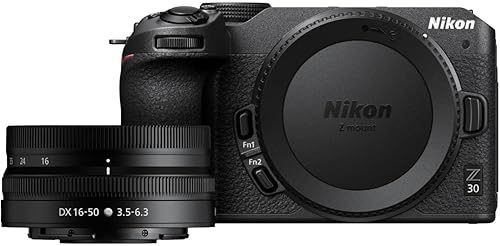
Nikon Z30 vs Z50: which is better for video?
The Z30 is the better fit for regular vlogging, streaming or recording yourself. Its flip-out screen stays visible from in front of the camera, and it supports webcam use through USB-C.
The screen is only one part of the Z30's video setup. It also has a built-in stereo microphone with adjustable sensitivity, a red recording light, and eye tracking for people and pets.
These details help when you need to keep yourself in frame and focus while speaking or moving around.
The Z30 supports Full HD 60p streaming over USB-C and 4K 30p streaming over HDMI. Before building a stream setup, decide whether you'll connect directly to a computer by USB-C or route the camera through HDMI, then check that your computer and software support that path.
The Z50 records 4K UHD video and has a touch LCD that flips down for self-portraits and blogging. It can work when the camera sits on a table or another support, but its screen position is less convenient if you need to see yourself from in front of the camera.
Nikon Z30 vs Z50 for recording yourself
Choose the Z30 if you want to monitor your framing while standing in front of the camera. The side-flipping screen is easier to see when the camera is on a tripod or held out in front of you.
The Z30's smartphone app can control the camera remotely with a compatible phone. That can help if you set the camera down to record a demonstration or a room view and want to start or adjust the shot without reaching for it.
The Z50's screen faces down when tilted for a selfie view. Check the placement with your planned support before buying, especially if the camera will sit on a tabletop tripod or other accessory that may occupy space beneath it.
For more beginner options across camera types, see our guide to the best cameras for beginners. If you already know you want Nikon, compare other entry-level choices in our Nikon beginner camera guide.
Which camera suits still photography?
The Z50 is the clearer choice if still photos are your priority and you want a stated 20.9 MP sensor. Both cameras share APS-C format and 11 frames-per-second continuous shooting, so those details do not separate them as much as their screens and video tools do.
Both cameras list a maximum display resolution of 5,568 x 3,712 pixels. That is a display specification, not a second sensor-resolution figure, so use the Z50's stated 20.9 MP sensor as the relevant resolution detail in this comparison.
The Z30 can still suit someone who takes plenty of photos alongside video. It shares the 16-50mm lens range, APS-C format and continuous-shooting rate, but its standout extras are aimed at recording and streaming.
For family gatherings, travel, food and everyday scenes, either kit gives you a general-purpose zoom lens to start with. If you expect to photograph distant action or wildlife, plan for a longer lens as well: the included 16-50mm zoom is not a telephoto lens for faraway subjects.
Is the Nikon Z50 better for beginners?
The Z50 is a good beginner choice if you want one camera for stills and video and value its 20.9 MP sensor. Wi-Fi and Bluetooth support smartphone pairing, and the touch screen can tilt down for self-portraits and blogging.
A first-time camera owner who expects to make tutorials or speak to camera may find the Z30's screen easier to work with. Its built-in microphone and webcam options also reduce the number of separate pieces needed to start creating video.
Neither model removes the need to learn basic exposure and focus choices. Begin with automatic settings, then practice changing one control at a time as you learn how aperture, ISO and shutter speed affect a photo.
Our guide to Nikon cameras for beginners can help you compare models beyond these two.
Do both cameras include the same zoom lens?
Both kits include a 16-50mm zoom lens, so the starting focal range is similar. The Z30 kit specifies a NIKKOR Z DX 16-50mm f/3.5-6.3 VR lens, and the Z50 kit includes a 16-50mm VR lens.
At the wide end, the lens can take in a room or a broader travel scene. At the tighter end, it can frame a person or detail more closely, though you will need to move nearer or add another lens for subjects that are far away.
The cameras work with Nikon Z lenses. The Z50 also supports F Mount NIKKOR lenses through a separate FTZ adapter, which can be useful if you already have compatible Nikon lenses and want to keep using them.
Think about the lens system as part of the camera decision. If you own F Mount lenses, include the adapter in your plan for the Z50.
If you are starting from scratch, both kits give you a Nikon Z mount and a general-purpose zoom to begin with.
For sports or wildlife, reach can matter more than the difference between these bodies. Review camera options for sports photography and pay close attention to the lens reach those situations call for.
What do the screens and controls change?
The Z30 screen flips out to the side, while the Z50 screen flips down. That physical difference affects how easily you can see yourself and where you can put the camera.
The Z30 screen can face forward without sitting directly below the camera, making it a natural fit for a tripod or a handheld vlog. Its built-in stereo microphone and red recording light are also useful when you're the person in front of the camera and want a clear sign that recording has started.
The Z50 screen is suited to self-portraits and blogging when the downward-facing position works with your setup. If you often use a support, microphone or other accessory below the camera, check whether those pieces leave the display visible.
For still photos of people, pets or scenery, you may spend less time looking at the screen from the front. In that case, the screen design may matter less than the sensor, lens choices and whether you want the Z30's video controls.
What should you set up before your first shoot?
Start by making the kit ready for the type of photos or video you plan to create. Charge the battery, insert a compatible SD card, attach the 16-50mm lens and check that the camera can focus on your subject before you begin an important shoot.
For a vlog, set the Z30 on a stable support and turn its screen toward you. Confirm the framing, adjust the built-in microphone sensitivity for your surroundings, and make a short recording so you can check that your voice is clear and the camera is pointed where you expect.
For webcam use, decide whether USB-C or HDMI best fits your setup. The Z30 supports Full HD 60p streaming over USB-C and 4K 30p over HDMI, so make the connection choice before you arrange the camera and desk.
For still photography, begin with the kit zoom and try both ends of its range. A wider view helps fit more of a scene; a tighter view narrows the composition, but it does not replace a longer lens when the subject is distant.
What mistakes can make either camera harder to use?
The most common buying mistake is choosing by a shared spec while ignoring how the camera will be positioned. Both have 4K video, a 16-50mm zoom and 11 fps continuous shooting, but their screen positions and video-focused tools serve different habits.
Don't assume the Z50 screen will flip out to the side. It flips down, so a front-facing recording setup needs a little more thought about the support beneath the camera.
Don't buy the Z30 solely because it includes video features if you mainly want a camera for still photos. Its creator controls can be useful, but the Z50's stated 20.9 MP sensor may be a more relevant point for a photo-first buyer.
Don't expect the kit zoom to cover distant wildlife or sports from the sidelines. If you can't move closer to your subject, investigate a longer compatible lens before treating the body as the solution.
Finally, don't plan streaming around a cable without checking the rest of the setup. Confirm the computer or capture device, the connection, the resolution you want and the software before you rely on the camera for a live session.
Which Nikon should you choose?
Pick the Z30 if vlogging, streaming or recording yourself is a regular part of your plan. Its side-flipping screen, adjustable-sensitivity stereo microphone, recording light and webcam options make it the more direct creator choice.
Pick the Z50 if you want a stills and video mix and value a stated 20.9 MP sensor. It also offers a path for compatible F Mount NIKKOR lenses through a separate FTZ adapter.
Skip the Z30 if you do not need its creator-focused video setup and would rather prioritize the Z50's stated sensor resolution. Skip the Z50 if you need a screen that faces forward from the side while you vlog or stream.
If you are still choosing a camera system, use our Nikon vs Canon guide for beginners to compare the broader options. For this Nikon Z30 vs Z50 decision, match the Z30 to front-facing video and the Z50 to a photo-and-video mix.
Frequently asked questions
Is the Nikon Z30 or Z50 better for beginners?
Either camera can suit a beginner moving to an interchangeable-lens system. The Z30 is easier to frame yourself with and includes video tools for creators, while the Z50 offers a stated 20.9 MP sensor and a screen that flips down.
Choose according to whether filming yourself or balancing stills and video matters more.
Do the Nikon Z30 and Z50 come with the same lens?
Both kits include a 16-50mm zoom lens. The Z30 kit specifies a NIKKOR Z DX 16-50mm f/3.5-6.3 VR lens, and the Z50 kit includes a 16-50mm VR lens.
Can you use the Nikon Z30 as a webcam?
Yes. The Z30 supports plug-and-play webcam operation over USB-C, Full HD 60p streaming over USB-C and 4K 30p streaming over HDMI.
Check that your computer, connection and streaming software support the setup you want.
Can the Nikon Z50 use F Mount lenses?
The Z50 works with F Mount NIKKOR lenses through a separately sold FTZ Mount Adapter. It also accepts Nikon Z lenses, so consider your existing lenses and whether you want to add the adapter.
Which camera has a screen that flips out to the side?
The Z30 has a flip-out touchscreen selfie monitor that can face you from beside the camera. The Z50 screen flips down, which can be useful for self-portraits but may be harder to see if a support or accessory sits below the camera.